
Hi everyone! Today I’ll be talking about an absolute lifesaver for living in Japan, transit apps. It was only my second or third day here that my host mother told me I wouldn’t survive without Yahoo Transit and, she was right. I’m going to go in depth about the two I use most often, Yahoo Transit and Jorudan, as well as quickly gloss over Google maps. All of these apps are available on Android and iPhone, and have desktop versions as well!
Google Maps:
I would be lost constantly without google maps, I frequently use it for walking directions. But, when it comes to timetables, at least in Japan it severely falls short. I was on a weekend trip with a friend who had done most of the planning and she was giving me options for our train the next day; saying there were only two options before having to wait several hours. That didn’t seem right to me, so I double checked on Yahoo Transit and sure enough, there were a lot more trains available. When it comes to making transit plans, I don’t recommend it.
Yahoo Transit and Jorudan
According to my host mom, Yahoo Transit is on every Japanese phone, nobody lives without it. I can’t speak for the accuracy of that statement, but it sounds pretty reasonable to me. Between this and Jorudan, I find Yahoo to be much more user-friendly despite the biggest catch:
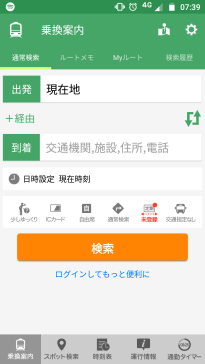
It’s entirely in Japanese. This might not be the worst for someone trying to learn the language, but I’m sure it puts a damper on things if you are not. Not only is it in Japanese in terms of reading, but the search function doesn’t understand roman characters, so you need a Japanese keyboard installed to input stations names as well. The functions are very straight forward though, and easy to navigate if you understand them.
Okay, maybe I haven’t convinced you. That’s fine, that’s why I also like Jorudan.
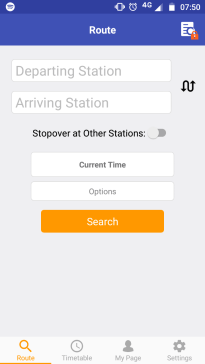
Unlike Yahoo, this app is entirely in English and on the surface looks pretty much the same. Let’s do a quick search to highlight the differences. I’m going to do the same search from Nagoya to Kyoto with both of them, and set the time to arrive at noon, today. It just so happens that the main stations in Nagoya and Kyoto are called Nagoya Station and Kyoto Station, so that makes this search easy. To Google map’s credit, if you’re, for example, trying to get to a movie theater on the other side of the city and don’t know which station you should go to, it can tell you that information and help you figure out where you need to go. These apps can only tell you how to go where you know you want to. Anyway, let’s hit search on both these apps.
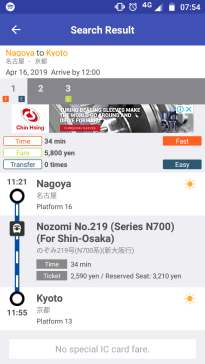
When you search with Jorudan, it has the option numbers listed towards the top, as you can see here it’s given three routes. The orange, blue, and green boxes you see are shorthand for fastest time, easiest route (least amount of transfers), and cheapest ticket. The default settings have it organized by fastest time, but you can change this. If you click on the different numbers it will show the details of all three route options.
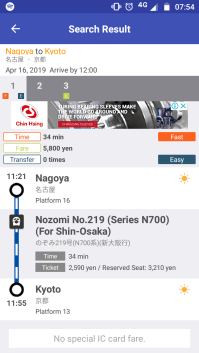
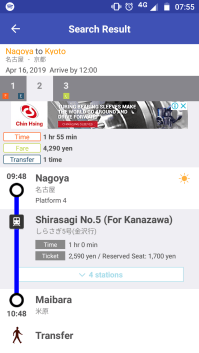
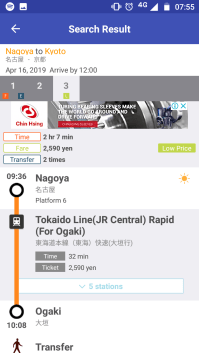
As you can see, each route provides information in regards to departure and arrival time, cost, which platforms you get on and off at, and an expandable list of the station names that come before your stop. A quick note, if you’re searching on the Jorudan website, it will not include the platform numbers, and say that such information is available for paid members. Don’t fall for this, as the information is right there on the app version. Knowing your platform numbers in advance is super helpful, especially when transfers are involved.
Alright, let’s move on to what Yahoo has to offer and then further compare the two.
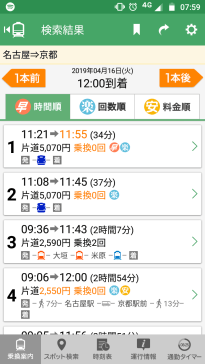
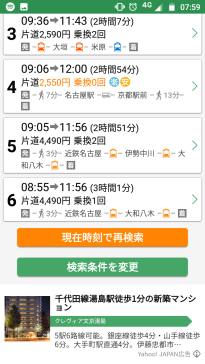
Now, this is the same exact search parameters as with Jorudan, and already you can see not only the app’s formatting is extremely different, but also the search result has been doubled. This result screen gives a quick breakdown of the different routes, times, costs, transfers, and with the pictographs you can tell if it’s a shinkansen (1 and 2), above ground trains (3, 5, and 6), or even a bus (4). This app also uses the same shorthand as Jorudan, with orange, blue and yellow circles representing fastest time, easiest route, and cheapest ticket.
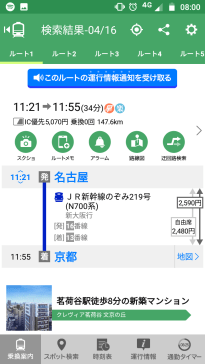
Clicking an option gives you further details such as platform numbers, train names, an expandable list of stations before your stop, and ticket information. The arrows represent what part of the route a certain ticket covers. Here’s a different search for a better example of this.
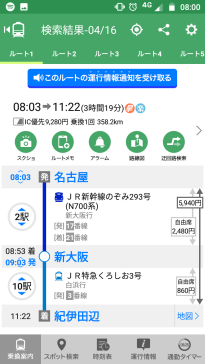
If you read my How To Ride The Shinkansen post, you know about fare and seat tickets. The yen amount that has arrows from top to bottom is the fare ticket, the other two are the seat tickets. Jorudan does a similar thing, but the formatting looks more like easily missed fine print so be careful and always refer to the fare listed at the top.
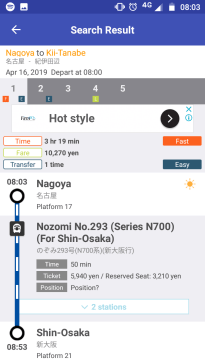
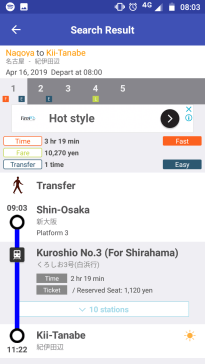
You may have noticed by now that the fares between these apps for the same searchers are a little different. That’s because although I made the times the same, I was searching on the default settings. Yahoo uses a default of unreserved seats and Jorudan uses reserved seats. Reserved seats are a little more expensive because you are guaranteed a seat, whereas you may be left standing if you have an unreserved ticket.
And that’s it! These apps are pretty straightforward. I have a preference for Yahoo because of the way it shows a summary of all the search results and is more flexible in the options it gives, but honestly, they’re both fine and will help you get to where you need to go! Also, with these apps, you can input future dates and times, to plan for trips. I used them to figure out my entire trip to Wakayama almost two months in advance. I hope someone found this helpful, happy travels!


Great post 😄
LikeLike